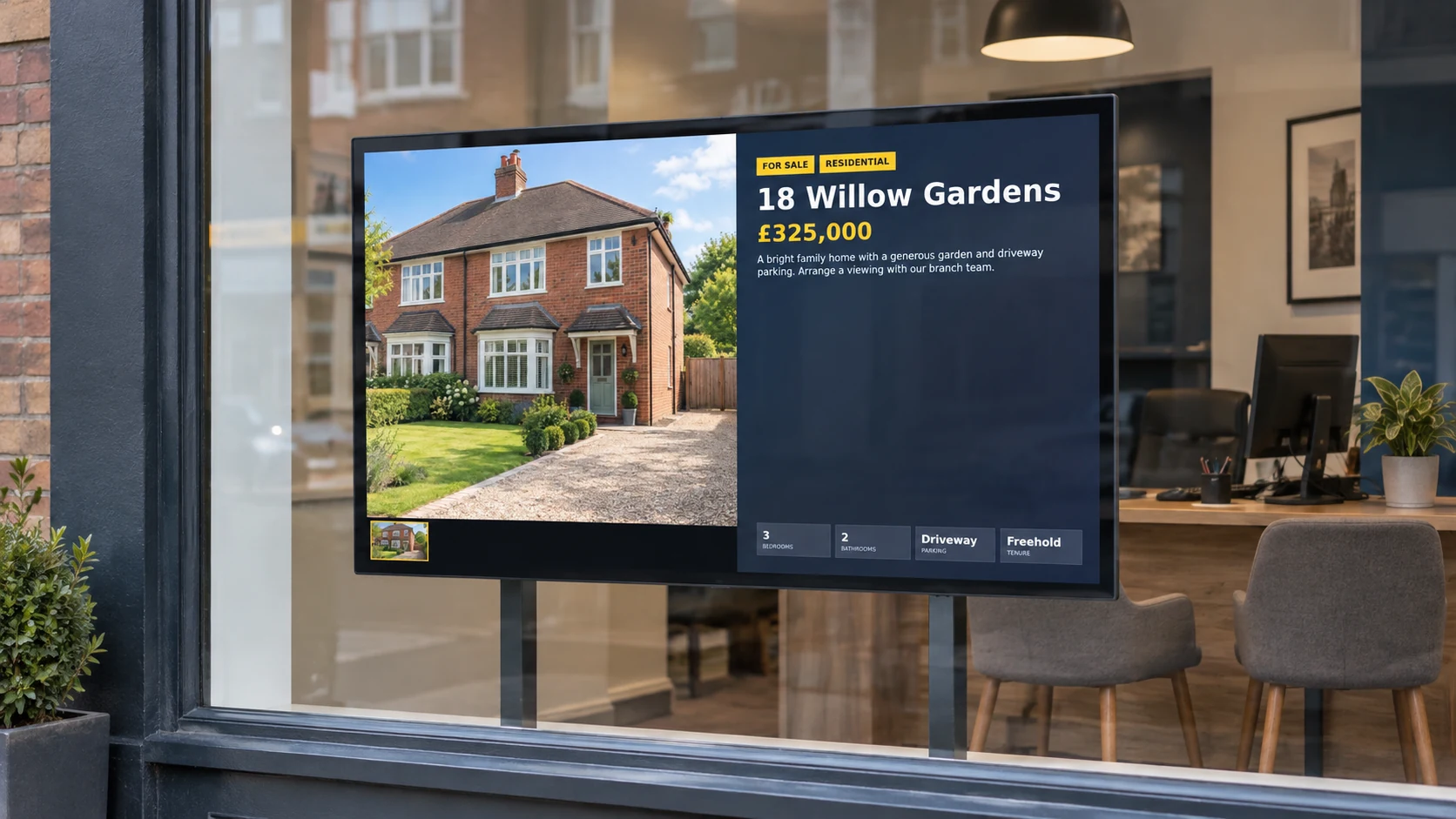
Estate agent window displays

Turn passing interest into property enquiries

Show available homes, new instructions, rentals and branch messages on bright window and reception screens.

Add property details and photos once, choose how they look, and keep every branch display current as listings change.

The day-to-day challenge

Property displays have to keep pace with the market

New instructions arrive, prices change and properties sell or let. Printed cards take time to replace, while handmade slides make it hard to keep a consistent branch look.

DisplayFlow turns property details and photos into ready-to-show listings. Edit a property once and keep window and reception screens in step without rebuilding the design each time.

What you can do

Everything needed for clear, useful screens

  • Create sales, rental, commercial and room-hire listings
  • Add prices, descriptions, rooms and useful property details
  • Choose several photos and a clear display style
  • Leave out details that do not apply
  • Check a listing before it goes onto a screen
  • Mix properties with valuation messages, reviews and branch news
Why it helps

Make the branch window work beyond opening hours

More stopping power

Rotate large property photos and short, readable details to catch attention from people passing the branch.

Fresher listings

Bring new instructions and price changes forward, then remove or replace properties that are no longer available.

More reasons to enquire

Balance listings with valuation invitations, landlord messages, buyer registration and branch contact details.

Where screens work well

Use each branch screen for a clear purpose

  • Main window: a rotating selection of available properties
  • Secondary window: rentals, new instructions or premium homes
  • Reception: local market messages, services and branch news
  • Meeting area: featured developments or room-hire opportunities
  • Multi-branch network: local listings and messages for each office
Easy everyday changes

Reflect property changes without remaking slides

  • Add a new instruction
  • Show a revised price
  • Mark a home sold subject to contract or let agreed
  • Change the featured photo
  • Move a listing to a different branch screen
A day on your screens

Keep the window balanced and interesting

A useful loop mixes fresh stock, clear calls to action and proof that the branch is active in the area.

New this week

Lead with recent instructions and strong photos to give regular passers-by something new to notice.

Available now

Rotate a balanced mix of homes, rentals or commercial spaces with the details people need first.

Branch results

Use sold and let messages to show activity, while keeping claims accurate and current.

Start an enquiry

Invite valuations, buyer registration, landlord enquiries or a conversation with the branch team.

Property listing builder

Create listings without designing every screen

Enter the property information, choose photos and select a display style. Details that are left blank stay out of sight, helping every listing remain tidy.

The same approach also supports commercial property and rooms or venues for hire, including capacity, rates, seating, catering, bar facilities and booking details.

A simple listing routine

From new instruction to branch window

  • Add the property photos and keep them together under the address.
  • Enter the address, asking price or rent, description and the details buyers or tenants need.
  • Choose the strongest photos and a display style that suits the screen.
  • Check the finished listing, save it and add it to the chosen window or reception display.
  • Return to the same listing for price changes, status updates or a new lead photo.
Getting started

Three simple steps to your first screen

1

Choose the window view

Decide which screen will be easiest to read from the pavement and keep the first display simple.

2

Add a strong property mix

Begin with recent, varied listings and large photos, then add a clear valuation or enquiry message.

3

Build updates into the routine

Make screen changes part of the same branch process used for new instructions, price changes and agreed sales or lets.

Screen ideas

Example screen uses

These are practical examples, not customer case studies.

Window listing loop

Rotate featured homes with a large photo, price, address and the details people want at a glance.

Rental availability

Show active rentals with monthly rent, furnishings, key features and a simple enquiry prompt.

Premium property feature

Give a standout home, new development or commercial instruction more time and larger photography.

Your screens

Use a screen you already own or choose a ready-to-use kit

Use a suitable screen in a branch window or reception area, or choose a ready-to-use kit for a dependable display that can run after the office closes.

You can open DisplayFlow on a suitable TV, or choose the optional £175 ready-to-use bundle for one screen for one year. No VAT is currently charged.

See screen kit options or read the simple setup guide.

Pricing

Start with one screen

Plans start from £10.00 per screen per month, with options for more screens and help creating your designs.

That keeps it suitable for one screen in a small business, or multiple screens across a venue.

View screen pricing.

FAQ

Questions for estate agents

Yes. Enter the property details, choose photos and select a display style. DisplayFlow arranges the information for the screen.

Yes. Choose more than one photo and use a display style suited to image-led property marketing.

Edit the existing listing and the screens showing it will receive the revised information.

Yes. You can create commercial listings and spaces for hire, including capacity, rates, facilities and booking details.

Yes. Each branch screen can have its own selection of local listings and messages.

Yes. With a suitable window screen and setup, the display can continue attracting interest outside office hours.

Next step

Put your latest properties in the window

Try DisplayFlow for one branch window or ask about joining up property displays across several offices.

WhatsApp Chat with us